


 The article has been updated successfully.

There are 2 steps to configuring Holdem Manager to work with Full Tilt Poker:
- Setup Full Tilt Hand History Options
- Setup Holdem Manager Auto Import Folders
- Full Tilt.eu Relaunch Notes (2/20/2013)
Once the above steps have been successfully completed, your HUD will be operational.
Setup Full Tilt Hand History Options
Note: Always make sure you have the latest version of Holdem Manager before proceeding! http://www.holdemmanager.com/downloads/HmBetaUpdate.exe
If using Vista or Windows 7, make sure UAC is disabled. UAC stands for User Account Control and can be disabled in Windows Control Panel / Accounts.
- Disable Vista UAC Help
- Disable Windows 7 UAC Help
- Launch Full Tilt Poker.
- Go to Options / Hand History. The Instant Hand History dialog will pop up.
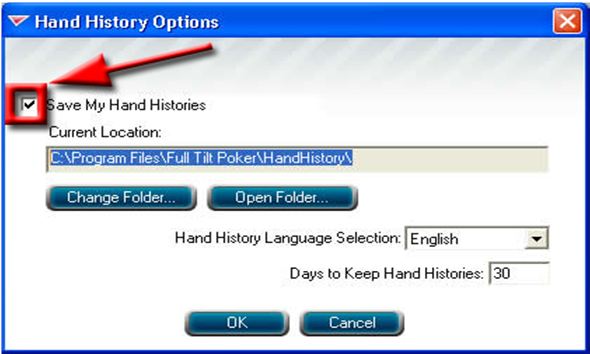
- Make sure the "Save My Hands History" box is checked.
- Note the folder where Full Tilt is saving these Hand History Files. (Write it down, we may neeed this later.)
- Make sure you are saving "English" Hand Histories
Windows 7 & Vista Users: If Full Tilt is saving your Hand History files to C:\Users\Username\AppData\Local\Full Tilt Poker\Handhistory. These are Hidden Files by default so if you're going to use this folder for your Hand Histories you must tell Windows to unhide Hidden Files files.
Note: Please set FTP lobby clock = local time and then set Site Time Adjustments in HM = 0.
Now we're ready to tell Holdem Manager where these Hand Histories are. (Click Here)
Full Tilt.eu Relaunch Notes (2/20/2013)
- The new FTP update removes seating preference settings inside of FTP. You will need to reset these settings.
- Live Tracking - Dealer messages go back to ‘normal’ (instead of everything). You will need to set your dealer chat to everything to use HM1 live tracking feature.
- Table Finder must be used: You will have to use TableFinder the first time you play so HM1 can recognize the tables. After TableFinder is used once, you won't have to use it again.
- Notes are missing - You’ll have to find the old %username%.xml file (in the old Program Files/Full Tilt Poker folder) and replace the new one in the Program Files/Full Tilt Poker.eu folder)


