


 The article has been updated successfully.

Overview:
There are 2 steps to configuring Holdem Manager to work with the Merge Network:
Once the above steps have been successfully completed, your HUD will be operational.
Setup Merge Network Hand History Options
Note: Always make sure you have the latest version of Holdem Manager before proceeding! http://www.holdemmanager.com/downloads/HmBetaUpdate.exe
If using Vista or Windows 7, make sure UAC is disabled. UAC stands for User Account Control and can be disabled in Windows Control Panel / Accounts.
- Disable Vista UAC Help
- Disable Windows 7 UAC Help
- Launch Merge Network poker skin.
- Make sure the client is saving Hand Histories like the screen below.
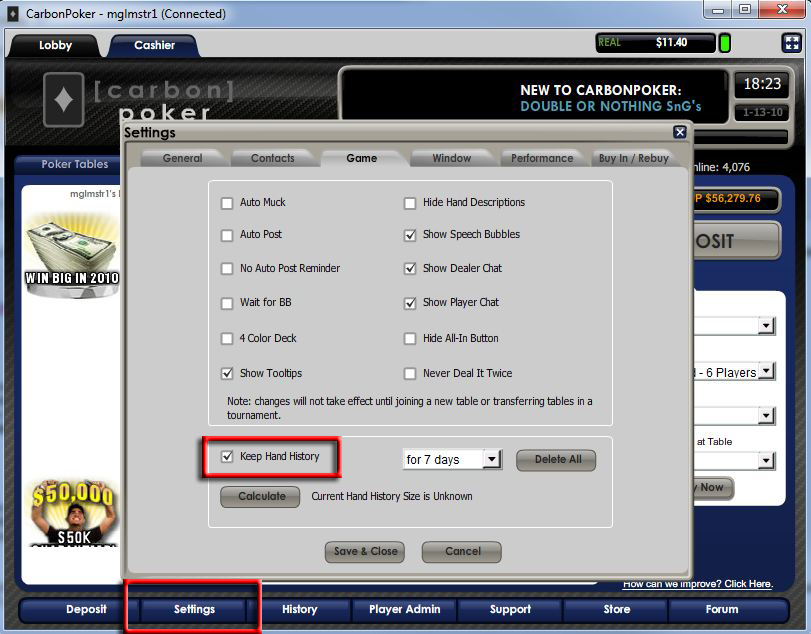
- Note that the Merge Network saves hand history files to C:\Program Files\CarbonPoker\History or you may also find them at this location C:\Program Files\Merge\CarbonPoker depending on the skin.
- Play a couple small stakes hands so there are hand history files in the above folder.
Now we're ready to tell Holdem Manager where these Hand Histories are. (Click Here)


